
HUAWEI B593s-22 DRIVER | HUAWEI B593s-22 FIRMWARE UPGRADE | HUAWEI FIRMWARE B593s-22
Version:
V200R001B180D15SP00C00 universal
Category:
Gateway Router
Operating Systems:
Windows

Wireless
Download Huawei B593s-22 Firmware V200R001B180D15SP00C00 Universal, Huawei B593s-22 firmware update download, download firmware Huawei B593s-22, free download Huawei B593s-22 driver windows 7/8/XP, mac, Huawei B593s-22 driver download, Huawei B593s-22 firmware downgrade software, descargar gratis Huawei B593s-22 firmware upgrade, telecharger firmware B593s-22

»»» DON’T FORGET TO LIKE US ON FACEBOOK GOOD VISIT «««
As you might already know that network provider keeps changing settings of his devices by pushing the firmware / software update. If you facing problem in unlocking or want to change the firmware of B593s-22 router then proceed with the below steps.
How to change the firmware of Huawei B593s-22 4G CPE router ?
2. Download WinRAR and install in Windows PC.
3. Connect the Huawei B593s-22 WiFi router to PC with LAN cable and assign the static IP address to the PC network port connected to the HUB (like 192.168.1.5).
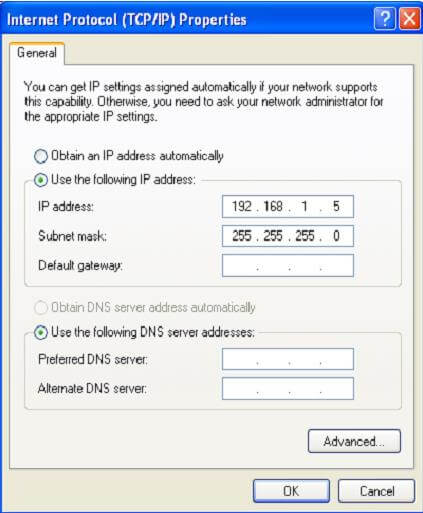 4. Open the downloaded multi upgrade tool. Click on refresh to refresh the network card list, and then select the network card whose IP address is 192.168.1.5.
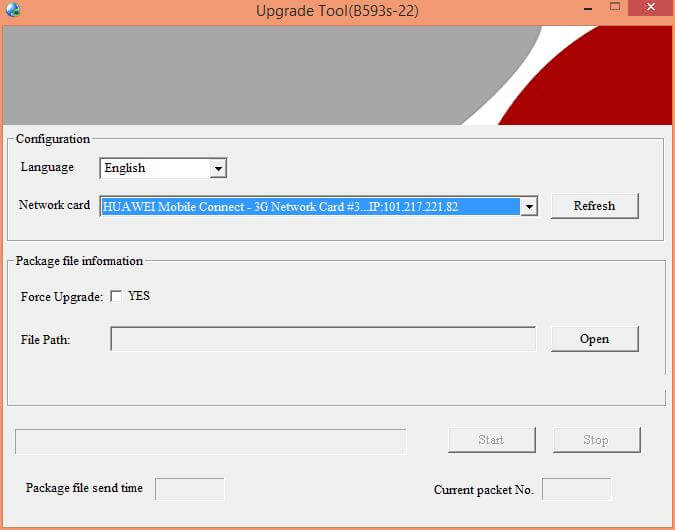 5. Click Open. A dialog box for selecting the upgrade file will be displayed. Select the upgrade package B593s.bin, and then click Open.
6. If, below the File Path box, the version number is displayed as the error information such as Error file version… or Analyse time-out…, it indicates that the upgrade package is incorrect.
7. Click Start to start sending multicast packets.
7. After the successful upgrade is complete, all the five signal indicators will be ON on the router.
8. Close the B593s-22 multicast tool.
10. Power off the HUB and enjoy the B593s CPE router.
If your B593s 4G CPE router does not allow the change or create the new APN, follow this post.
How to Debranding HUAWEI B593s-22 4G CPE Router
How to Debranding HUAWEI B593s-22 4G CPE Router
1. Connect Modem to your PC’s LAN port
2. Turn your modem ON.
3. Open Multicast & Follow screenshot settings 
4. Before Clicking Start button in the MULTICAST Software, Make sure to turn off the modem first.
5. Click Start Button and turn the modem on, and when the signal bars are full, it means that the debranding is finished..
6. Click Stop and Close MULTICAST
.
7. Turn Modem OFF then Turn it ON again (RESTART).
8. Now Open GUI in your browser and you will see HUAWEI logo instead of your carrier/network’s logo.