

The BIOS boot partition is a partition on a data storage device that GNU GRUB uses on legacy BIOS-based personal computers in order to boot an operating system, when the actual boot device contains a GU >[1]
A BIOS boot partition is needed on GPT-partitioned storage devices to hold the second stages of GRUB. On traditional MBR-partitioned devices, the disk sectors immediately following the first are usually unused, as the partitioning scheme does not designate them for any special purpose and partitioning tools avoid them for alignment purposes. On GPT-based devices, the sectors hold the actual partition table, necessitating the use of an extra partition. On MBR-partitioned disks, boot loaders are usually implemented so the portion of their code stored within the MBR, which cannot hold more than 512 bytes, operates as a first stage that serves primarily to load a more sophisticated second stage, which is, for example, capable of reading and loading an operating system kernel from a file system.
Contents
Overview [ edit ]
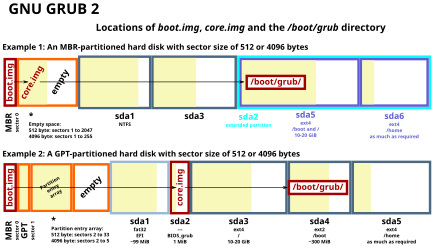
When used, the BIOS boot partition contains the second stage of the boot loader program, such as the GRUB 2; the first stage is the code that is contained within the Master Boot Record (MBR). Use of this partition is not the only way BIOS-based boot can be performed while using GPT-partitioned hard drives; however, complex boot loaders such as GRUB 2 cannot fit entirely within the confines of the MBR’s 398 to 446 bytes of space, thus they need an ancillary storage space. On MBR disks, such boot loaders typically use the sectors immediately following the MBR for this storage; that space is usually known as the «MBR gap». No equivalent unused space exists on GPT disks, and the BIOS boot partition is a way to officially allocate such space for use by the boot loader.
The globally unique >[2] (which, when written to a GPT in the required little endian fields, forms the ASCII string «Hah!IdontNeedEFI«). In the context of GPT on a BIOS-based computer, a BIOS boot partition is similar in some respects to the EFI System partition, which is used by systems based on EFI. The EFI System partition holds a filesystem and files used by the UEFI, while the BIOS boot partition is used in BIOS-based systems and accessed without a filesystem by holding raw binary code.
The size requirements for a BIOS boot partition are quite low so it can be as small as about 30 KiB; however, as future boot loaders might require more space, 1 MiB might be a reasonable BIOS boot partition size. Due to the 1 MiB partition alignment policies used by most modern disk partitioning tools to prov >[ citation needed ] since it is written to very infrequently.
Creation [ edit ]
The following utilities are known to support BIOS boot partitions:
Я заново установил Ubuntu 14.04LTS
I 4 Жесткий диск. 3 HDD (1TB, 1TB, 2TB) один SSD (120gb) ОС Windows 10 занимает SSD. Если я не ошибаюсь, я установил Grub ранее, на SSD или на 2TB HDD. другие 2x1TB выделяются для хранилища Windows 10, и я бы не касался этого.
Была попытка отладить эту проблему с загрузкой в течение почти 6 часов. Раньше он загружался хорошо, но после переформатирования части Linux и повторной установки я больше не могу получить доступ к меню Grub.
Что у меня: ОС Windows 10 на SSD 120 ГБ Этот устанавливаемый Linux на жестком диске 2 ТБ
Вещи, которые я пробовал:
Запустите Boot-Recommended Repair
Переформатируйте всю часть Linux и вручную переустановите разделы.
Я попытался создать новый раздел 1 ГБ для решения раздела GPT, но, похоже, не решил проблему. of
Полный отчет о проблеме.
3 ответа
Вы создаете раздел BIOS-Boot с разделом флага bios_grub в соответствии с этими ссылками,
Если вы хотите установить Ubuntu на GPT-диск (вы можете проверить его с помощью команды sudo parted -l), вам понадобится раздел EFI (если ваша BIOS настроена в режиме EFI) или BIOS -Boot (если ваша BIOS настроена в режиме Legacy).
- Точка монтирования: нет
- Тип: без файловой системы
- Описание: раздел BIOS-boot — это контейнер для ядра GRUB 2. Это необходимо, если вы устанавливаете Ubuntu на GPT-диск, и если микропрограмма (BIOS) настроена в режиме Legacy (не EFI). Он должен быть расположен в начале диска GPT и иметь флаг «bios_grub».
- Размер: 1 МБ.
Похоже, вы загружаетесь в устаревшем режиме, но ваш диск 2T использует разделение gpt, которое не оставляет места за пределами разделов для core.img grub. Вам нужно предоставить явное пространство для его размещения, небольшой (1-2M (это M not G!)) Раздел с флагом grub-bios должен это сделать. Затем grub будет полностью установлен и работать.
Я довольно новичок в этом, поэтому мне потребовалось некоторое время, прежде чем понять, как решить подобную проблему. В моем случае это было немного легче, так как я просто решил установить Ubuntu на весь мой компьютер.
Но это то, что я понял: — Используя первую ссылку, данную sudodus, я использовал ‘sudo parted -l’ в терминале, чтобы прочитать, какие разделы на моем диске были. — Он распечатал список разделов. Там вы можете увидеть, есть ли у вас EFI или раздел загрузки BIOS. EFI в моем случае. — Ссылка sais «Описание: раздел EFI (также называемый ESP) содержит некоторые загрузочные файлы. Это необходимо, если микропрограмма (BIOS) настроена на загрузку жесткого диска в режиме EFI (который по умолчанию используется по все более современным, > , компьютеры 2011 года). Он должен быть расположен в начале диска GPT и иметь флаг «boot». — То же самое «sudo parted -l» распечатало мне, что EFI была расположена в начале диска, и у него был флаг загрузки. — Итак, я перезапустил и открыл BIOS. Там моя BIOS не была загружена в режиме EFI, поэтому я перешел на загрузку в режиме EFI.
Теперь это работает. Я не знаю, почему, когда я установил ubuntu с живого USB, по умолчанию режим загрузки не был установлен на правильный . но теперь это так.
There seems to be quite a bit of discussion about this but I can’t find a simple answer.
When I try to install grub2 I get this error:
Here is the layout of /dev/sda:
Is there a simple way that I can get around this problem? I understand that I need to create a tiny partition at the beginning of the disk as a «BIOS Boot Partition». I suppose one option would be to move the swap to /dev/sda4 as a logical volume, and use /dev/sda2 as /boot.
Alternatively I could just go back to grub-legacy and not worry about that (is there really an advantage to upgrading to grub2 if it causes this much trouble?).
3 Answers 3
You should first determine whether you want to use a BIOS/CSM/legacy-mode boot or an EFI/UEFI-mode boot. The former is the way that PCs have been booting since the 1980s, but it’s an ugly and hackish system that will be going the way of the dodo before too long. Windows ties BIOS-mode booting to the MBR partition table, which you’re not using (but could; your disk is nowhere near big enough to require GPT). Linux, FreeBSD, and most other modern OSes are more flexible, and support BIOS-mode booting from GPT; but there are sometimes firmware-created complications, and of course if you later decide to install Windows in a dual-boot setup you’ll need to make changes or compromises.
EFI/UEFI-mode booting is less of a hack; but EFI implementations vary greatly in quality and the overall level of expertise and support on the Web for EFI is lower than that for BIOS. Windows ties use of GPT to EFI-mode booting, so if you expect to ever install Windows on your computer, EFI is definitely the way to go. Older computers are BIOS-only. EFI began to take off in the marketplace in mid-2011, so if your computer is older than that, you might not be able to use EFI.
If you go with BIOS-mode booting, you should create a BIOS Boot Partition on the disk. There’s enough room at the start of your disk for this partition, but you’ll need to set your sector alignment value to 1 (from the usual 2048) for this to work. I don’t know offhand if this can be done with parted , but you can do it with gdisk . (Note that the space at the start of your disk is slightly under the recommended 1MiB size for a BIOS Boot Partition, but just by a few sectors. It will probably work fine, but might conceivably fail at some point in the future.) Alternatively, you can shrink any of your partitions by 1-2MiB to make room for the BIOS Boot Partition. This partition does not need to be the first partition on the disk, although that’s the conventional location.
If you go with EFI/UEFI-mode booting, you must create an EFI System Partition (ESP). This partition must be FAT-formatted and must be significantly larger than a BIOS Boot Partition, so you’ll have to resize something to create it. I recommend a size of 550MiB, although a tenth of that might work in a pinch.
To install GRUB, you should first be sure that you’ve installed the correct GRUB package. I’m not sure of naming in all distributions, but in Ubuntu, it would be grub-pc for BIOS/CSM/legacy mode and grub-efi-amd64 for EFI/UEFI mode. An EFI-mode installation will also require booting whatever you’re using to install GRUB (a live CD/USB, presumably) in EFI mode. Doing this may require using your computer’s built-in boot manager, which is typically accessed via a function key, but the details vary from one computer to another.