
Паскаль онлайн
Не смотря на то, что Паскаль опускается в рейтингах языков программирования все ниже, но его популярность как учебного языка все еще высока. Для наших посетителей, школьников, учителей и тех, кто начинает изучать программирование предлагаем удобный онлайн компилятор Паскаля. Он отлично подходит для учебных целей. Здесь компилятора языка Паскаль — free pascal (fpc 3.0.0]) .
Паскаль | онлайн Вы получите не просто онлайн компилятор. Здесь совмещен онлайн редактор, онлайн компилятор , а также бланк (шаблон) простейшего кода. Учитывая, что сегодня школьники и студенты часто используют смартфоны для доступа к онлайн-сервисам, мы максимально адаптировали наш онлайн компилятор под смартфоны. Пробуйте — надо просто зайти по ссылке из вашего браузера.
Тут также можно вводить данные для программы в окне «input» и смотреть результаты в окне «output». Чтобы понять как вводить данные, которые требуются программе смотрите пример «working example». Нужные данные вводятся в окне «input» последовательно с новой строки.
Остается только внести в программу ваши данные и нажать кнопку «RUN» (клавиша F9).
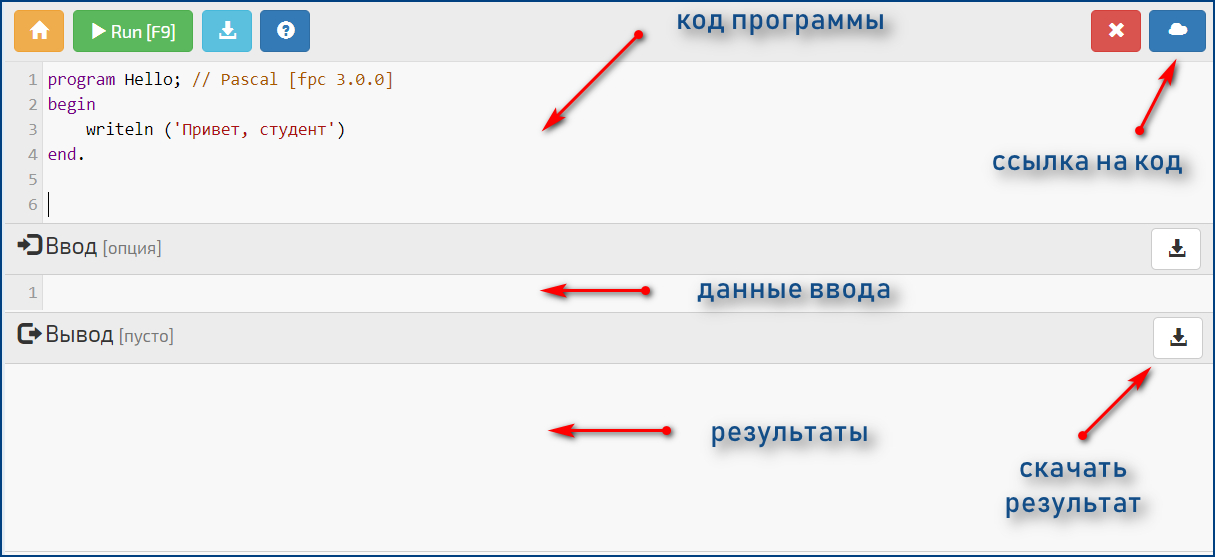
Вы можете писать в комментариях ваши замечания, отзывы и самое главное — предлагайте типовые примеры задач, которые вам надо решить или вы смогли решить в нашем компиляторе. И как бонус — кроме Паскаля у нас на сайте есть еще несколько компиляторов для других популярных языков программирования: С++, Python и др. Если вам нужны другие языки — пишите, добавим.


Ребят срочно помогите . Пожалуйста .
Что тут не так .
При построении график пишет что значение недопустимо мало или недопустимо большое

Но, не забудьте еще в поле «Ввод», компилятора ввести значения для a и b (каждое в отдельной строке)
Всем привет, подскажите, в чем ошибка?)
program ded;
uses GraphABC;
var pic : integer;
begin
SetWindowSize (700, 750);
ClearWindow (clBlack);
SetFontSize(20);
pic:=LoadPicture(‘bohr.jpg’);
DrawPicture (pic, 30, 30, 180, 200);
SetFontColor(clGreen);
TextOut(100,240,’Бор’);
pic:=LoadPicture(‘Galileo.jpg’);
DrawPicture (pic, 210, 230, 200, 230);
SetFontColor(clBrown);
TextOut(250,470,’Галилео’);
pic:=LoadPicture(‘Einstein.jpg’);
DrawPicture (pic, 30, 460, 180, 210);
SetFontColor(clRed);
TextOut(50,680,’Эйнштейн’);
pic:=LoadPicture(‘Leonardo.jpg’);
DrawPicture (pic, 410, 60, 180, 210);
SetFontColor(clBlue);
TextOut(440,280,’Леонардо’);
pic:=LoadPicture(‘Newton.jpg’);
DrawPicture (pic, 410, 400, 190, 210);
SetFontColor(clPurple);
TextOut(450,620,’Ньютон’);
end.
for i:=300 to 400 do
if (a mod 10) mod 2 = 0 then
if sum mod 9 = 1 then writeln(i);
Частично утерянная последовательность
Во время перерыва Лена, экспериментируя, начала писать на доске последовательность, в которой число под номером i равно i*i+C (i=1,2. ), где C — неотрицательное целое число. Написав несколько первых чисел, Лена отвлеклась на телефонный звонок. Возвращаясь к доске, она заметила, что Паша стёр число С, а также все числа последовательности, кроме двух последних. Отогнав его от доски, Лена решила восстановить последовательность, но забыла число С. Помогите ей вспомнить это число или скажите, что её последовательность не могла оканчиваться двумя оставшимися на доске числами.
Формат входных данных
В единственной строке входных данных находятся два положительных числа A и B — два последних числа напианной на доске последовательности.
Решение будет оцениваться следующим образом:
В первом наборе тестовых данных числа A и B не превышают 1000. Если программа выдаёт верные ответы на все тестовые данные из первого набора, участнику начисляется 20 баллов.
Во втором наборе тестовых данных числа A и B не превышают 1000000000 (10^9). Если программа выдаёт верные ответы на все тестовые данные из второго набора, участнику начисляется еще 20 баллов.
В третьем наборе тестовых данных числа A и B не превышают 1000000000000000000 (10^18). Если программа выдаёт верные ответы на все тестовые данные из третьего набора, участнику начисляется еще 60 баллов.
Формат результата
Выведите неотрицательное целое число С или -1, если последовательность Лены не могла оканчиваться на числа A и B.
«Студент читает условие задачи: «найти площадь фигуры, ограниченной указанными кривыми». Потом говорит преподавателю: «я не знаю, какие линии называются указанными». «
Pages
2.13.2014 Run Free Pascal programs without installing compiler (online)
Today we explore a painless online solution for running your Free Pascal programs online, without installing and configuring a compiler yourself! Neat!
Introduction
Very often we are at a public PC where we don’t have a compiler installed. And may be your friend is asking to test a bit of code that he wants you to debug. Installing a compiler may not be an option at times. That’s when an online compiler comes in handy. Presenting IdeOne.com.
With this website you can compile your code online without the need of any special hardware resources and without a compiler in your computer. With an online compiler you can compile your Free Pascal code from any platform/OS in any location of the world, wherever you can run a web browser. You can even run your code from a mobile device, an iPhone or an Android device and what not — the sky is the limit.
Besides Free Pascal it supports a wide variety of languages, such as C, C#, C++, JAVA, Python, PHP, Javascript, ADA, FORTRAN, COBOL, Lua, Perl, Scala, SQL and many more.
The basic concept behind an online compiler is that a compiler program is installed and setup at a server. You can go to the online compiler’s website, enter your code and run it. The code will be run with the remote compiler and you can see the result in your browser. You can optionally specify input for the program to test it with your program.
In this little article we will discuss a freely available online compiler — ideone.com. It has the ability to use Free Pascal compiler and a bunch of others to compile your code online, without even touching any compiler yourself! Each code you execute/run is saved in a unique URL, so that you can share your code, the inputs and the results with anyone you please.
Registering
You can also sign up so that you can keep track of all your codes in that website. Plus, logging in gives you better editing options (such as editing the visibility of the code). Registering is not required to run your code, but I recommend you register there. It’ll definitely make your life easier.
Execute a sample code
We will try this online compiler to compile a test code Adding 2 numbers. You will see in a minute how easy it is to run and test your Free Pascal programs online.
First, go to http://www.ideone.com
(Optionally, you can register and login to keep track of all your codes, but its not required.)
Now you will see a text area showing up for entering code. It is set as Java by default. We will change it to Free Pascal. Click on the Choose Language dropdown menu and select Pascal (fpc).
You can now see a template for free pascal in the text box.
Now copy the code from the Add 2 numbers article, or the code below:
You can add the program addprog; line. But it seems that it runs fine without the line.
In this situation, we could run the code straight away. But it couldn’t add the numbers, well, if there is no numbers to add. We have used ReadLn() in our code, so we need to set some input for testing the program.
So, we open the StdIn input box through the button.
Now we have an input box for writing inputs. Go through the code and find ReadLn (or Read) lines. Done? Now check what the first ReadLn wants. See the previous line, it says- «Enter the first number:». So enter a number in the first line of stdin. For example, 10
Now go to the next ReadLn in the above code. The WriteLn before the line says- «Enter the second number:». So you enter another number in the stdin field. For example, 5
You can set the visibility of the code with these buttons:
Visibility determines how the program is visible on ideone.com and who can access it. Possible values are:
public — everyone has access to the code and it is listed at the recent codes page;
secret — everyone has access to the code and it is not listed at the recent codes page;
private — only author of the code has access to it and it is not listed at the recent codes page. To use this level of visibility you need to be logged in.
As you can see, you have greater option for customizing the visibility of your precious code if you are logged in.
Now, click on the «Run» button (or alternatively you can press Ctrl+E). Eventually, in a few seconds, you will see your code being executed.
See the output shown with a red arrow in the above image.
I have made the code public. Click here to see it in action!
You can also fork the code from the above page if you want to improve it.
In conclusion, it is not a full-fledged compiler. It has its limitations. It can process codes+input+output of total 64 kb. And code compilation should not exceed 10 seconds and execution time can be maximum 15 seconds and can only use 256 mb memory. If your code is in that limit, you can use this option to compile your code with this online compiler.
pastebin is a collaborative debugging tool allowing you to share and modify code snippets while chatting on IRC, IM or a message board.
This site is developed to XHTML and CSS2 W3C standards. If you see this paragraph, your browser does not support those standards and you need to upgrade. Visit WaSP for a variety of options.