
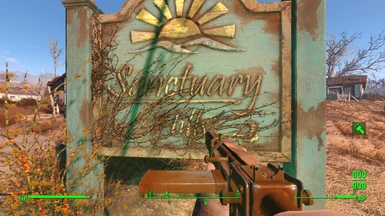
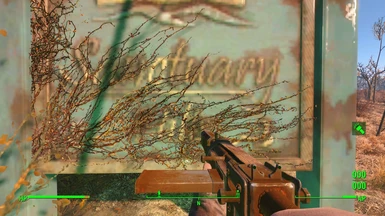
Исправляет размытые текстуры. Патч делал не я, я просто поправил строчку в enblocal.ini, так что теперь достаточно просто распокавать выйлы в корень игры.
Лицензионная версия игры из-за этого патча крашится, и, чтобы избежать краша, надо удалить из папки Steam файл GameOverlayRenderer64.dll.
To enjoy the benefits of Nexus Mods, please log in or register a new account
- All games
- Fallout 4
- Mods
- Visuals and Graphics
- Texture Load Workaround
File information
Last updated
Original upload
Created by
Uploaded by
Virus scan
Tags for this mod
298 comments

in fallout4custom.ini under [General]
iTextureUpgradeDistance1=0
iTextureUpgradeDistance0=1200
iTextureDegradeDistance1=0
iTextureDegradeDistance0=1600
fTextureUpgradeDisabledMinSpeed=6000.0000
fUpdateTextureTime=0.1
in fallout4prefs.ini
under [Display]
using these values will disable the «inbetween» textures when switching from lod to ultra (the «1» texture)
This also increases the «0» texture to around the default lower res textures.
upgrade disabled min speed seems to control disabling streaming while sprinting around
try increasing the values to suit your system
im using 5000 and 6000
EDIT Check the sticked post above!
EDIT!! Happening again on 1.9 and the hd texture pack EDIT.
found the setting for displacement maps, i was still getting textures popping on brick walls
add this to fallout.ini under general
the default is 1
I have also been using the values :
and i havent seen any pop in, and performance is better in dense areas.
EDIT: ive seen pop in with small objects, at random. a single fride, a trash can, and a sign.
only those 3 objects in a long run to the coastline.

^This, along with:
iTextureUpgradeDistance1=7500
iTextureUpgradeDistance0=5000
iTextureDegradeDistance1=7500
iTextureDegradeDistance0=5000
has COMPLETELY fixed the problem. My jaw dropped the first save i loaded, it seriously makes the game not only playable, but BEAUTIFUL; textures looking like they’re supposed to. Thank you sooo much @hellstorm102, I can finally play Fallout 4. I spent at least 6 hours trying to find a fix!!
My rig: AMD Phenom II x6 1100t @ 4.2GHz, 8 GB DDR3 @ 1766MHz 9-9-9-14 timings, AMD Radeon R9 390x @ 1150MHz core clock & 1700MHz Memory Clock, Game installed on decent quality 60GB SSD drive. I have not noticed any performance changes from this tweak!
I get an average of 30-40 fps @ 1900 x 1200 Ultra with Reshade and some other graphical ini tweaks and texture mods.

Дубликаты не найдены
1)Кидаем все файлы в папку с игрой (Там где Follaut4.exe)
2)В файле enblocal.ini поменяйте значение параметра ForceVideoMemorySize на true. Размер не трогайте.
у меня почему то просто кидает на офф страницу 🙁
Без регистрации и смс?
Поэтому я решил поиграть через годик. 🙂
С этим фиксом игра преобразилась =)
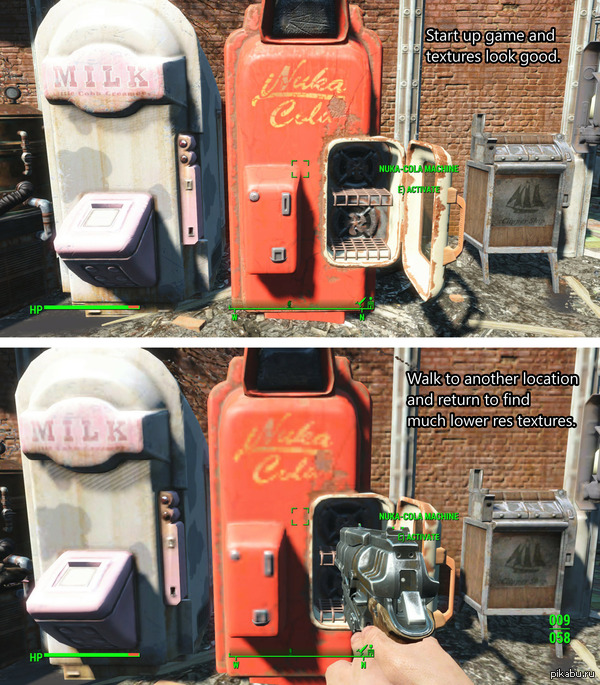
1) Я не знаю английского, переведите мне что написано на картинках, если вас не затруднит.
2) Выходя из первого вопроса что делает фикс?
3) Это поможет улучшить графику не повышая ресурсозатратность пк/ноутбука? Или понизит повысим тем самым скорость работы?
в игре проблема с подгрузкой текстур. На англ. написано что если отойти от объекта с хорошо прогруженными текстурами и вернутся к нему , он выглядит хуже (смысл). Фикс решает эту проблему. На производительности у меня не сказалось. GF650 TI
Как раз игру допилят патчами, фиксами, модами, и будет збс. Хотя лично меня эти размытые текстуры не бесили. 🙂
Это называется mipmapping. Просто в зависимости от расстояния, меняется уровень детализации геометрии LOD и текстур. По мере приближения игрока к объекту, срабатывает триггер и подгружаются более детальные текстуры и модели. А если триггер заглючило и он не сработал — текстуры остаются низкого качества.