

AMD выпустила очередную порцию бета драйверов.
- Star Wars™: Battlefront.
- Fallout 4.
- Assassin’s Creed® Syndicate.
- Call of Duty® : Black Ops III
Спустя две недели после релиза бета-драйвера Catalyst 15.11 компания AMD представила Catalyst 15.11.1 Beta. Новая версия содержит оптимизации для крупных игровых новинок: ролевой игры Fallout 4 от Bethesda Softworks и приключенческого экшена Assassin’s Creed Syndicate от Ubisoft, а также шутеров Star Wars: Battlefront от Electronic Arts и Call of Duty: Black Ops 3 от Activision.
Загрузить драйвер можно с официального сайта производителя или через приложение Catalyst Software Suit. Catalyst 15.11.1 предназначен для 32- и 64-разрядных версий Windows 7 (Service Pack 1), Windows 8.1 и Windows 10. Установить его могут обладатели видеокарт для настольных систем начиная серией Radeon HD 5000 и заканчивая Radeon R9 Fury и ускорителей для ноутбуков начиная серией Mobility Radeon HD 5000 и заканчивая Radeon R9 M300.
Компания предупреждает, что владельцы её видеоускорителей могут столкнуться со следующими проблемами:
- Assassin’s Creed Syndicate и Star Wars: Battlefront не запускаются в полноэкранном режиме на некоторых ноутбуках, оснащённых процессором Intel и графическим ускорителем AMD;
- в Call of Duty: Black Ops 3 может наблюдаться мерцание изображения в режиме DirectX 11 при использовании технологии AMD Crossfire;
- в Elite: Dangerous в режиме SuperCruise существенно снижается производительность;
- Far Cry 4 зависает при запуске на системах, оборудованных некоторыми видеокартами серий AMD Radeon 200 и 300 на Windows 7 и Windows 8.1;
- при запуске Windows 10 на некоторых системах с возможностью переключения видеокарты, оснащённых ускорителем серии Radeon HD 5000, может возникать чёрный экран.
24 ноября AMD выпустит программный пакет Radeon Software Crimson, разрабатываемый специалистами сформированного в октябре подразделения Radeon Technologies Group (RTG). Он будет содержать драйвер и приложение Radeon, представляющее собой усовершенствованный аналог Catalyst Control Center с совершенно новым интерфейсом — более быстрым, удобным и простым в использовании. С его помощью пользователи смогут создавать профили с индивидуальными графическими настройками для игр и вручную ограничивать кадровую частоту в модуле Game Manager, изменять характеристики видеокарты в меню OverDrive и управлять функциями Eyefinity и Freesync. Radeon Software Crimson рассчитан на широкую аудиторию пользователей, от геймеров до разработчиков.
NVIDIA выпустила новую версию драйвера для своих видеокарт с улучшениями для Fallout 4, Star Wars: Battlefront и StarCraft 2: Legacy of the Void на прошлой неделе.
To enjoy the benefits of Nexus Mods, please log in or register a new account
- All games
- Fallout 4
- Mods
- Patches
- Fallout 4 Crimson driver compass fix for AMD

File information
Last updated
Original upload
Created by
Uploaded by
Virus scan
Tags for this mod
About this mod
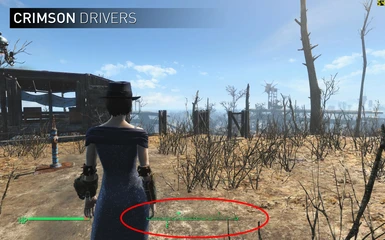
AMD users who updated drivers to the latest Crimson driver have been reporting an issue where their compass starts flickering and becomes unusable. A simple fix I found was using the .dll files from the previous 15.11.1 driver to fix it while still keeping the performance gains from the Crimson driver. Best of both worlds.
Author’s instructions
File credits
http://forums.guru3d.com/showpost.php?p=5195728&postcount=665
http://forums.guru3d.com/showthread.php?p=5195702#post5195702
PrMinisterGR for .dll files
Guru3D
Donation Points system
This mod is not opted-in to receive Donation Points
AMD users who updated drivers to the latest Crimson driver have been reporting an issue where their compass starts flickering and becomes unusable. A simple fix I found was using the .dll files from the previous 15.11.1 driver to fix it while still keeping the performance gains from the Crimson driver. Best of both worlds. Special thanks to Guru3D and PrMinisterGR for the dll files; http://forums.guru3d.com/showthread.php?p=5195702#post5195702
Here’s a video tutorial on how to install and use it. (Thanks to ZioGamers)
Also, here are older driver .dll files if the ones provided do not work.
https://mega.nz/#F!8tlAhDyQ!2AkAQukJKAYuIWEzDTGtFA!l4FjhA7R
Some other possible fixes I found where forcing Vsync from Radeon Settingson a Fallout 4 profile or re-validating your files.
Other than that I cannot really help, I just published this as an easy way to help others as well since I know this makes the game unplayable for most people and AMD takes forever to fix their drivers. I’m sorry but I really don’t have any knowledge into how these libraries really inject into the game and work. You can however ask around Guru3D for help, sorry but that’s just how things are.
Thanks for all your responses, good or bad. Hope you enjoy the game for those who got it working and sorry I cannot help more for those who could not.