
При несоблюдении некоторых инструкций подключения, а также по ряду внешних причин, клиент EsentialPIM Pro может выдать ошибку при подключении к базе. Ниже рассмотрены наиболее частые случаи и пути их решения.
1. Unable to complete network request to host
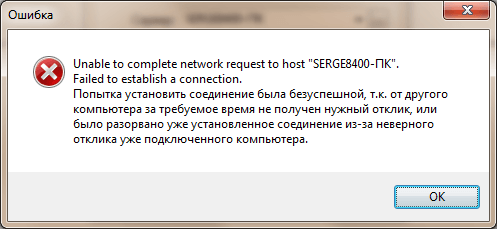
Причина данной ошибки в том, что клиент EssentialPIM Pro не может соединиться с сервером.
1. Убедитесь, что Firebird запущен на сервере и работает. Откройте диспетчер задач, включите опцию Отображать процессы всех пользователей , в списке процессов должны присутствовать процессы fbserver.exe и fbguard.exe. Если процессы отсутствуют, установите Firebird как это описано в инструкции соединения.
2. Проверьте настройки фаервола. Чтобы клиент EssentialPIM Pro мог общаться с сервером в брандмауэре должны быть открыты следующие порты:
— на сервере для fbserver.exe:
— входящие: 3050 и 3051
— исходящие : весь диапазон (fbserver использует случайный диапазон портов при обработке событий)
— на клиентском ПК для EssentialPIM.exe:
— входящие: весь диапазон
— исходящие: 3050 и 3051
2. Error while trying to open file. Системе не удается найти указанный путь
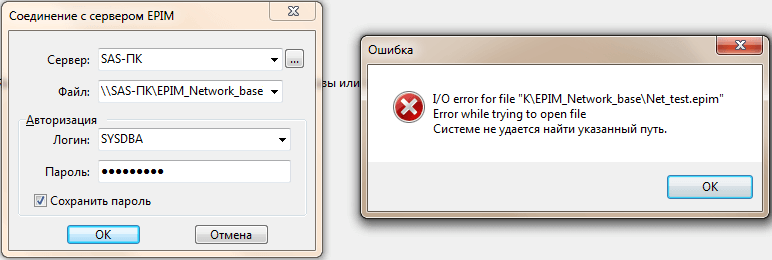
В данном случае клиент EssentialPIM Pro соединился с сервером, но файл базы данных отсутствует по указанному пути.
1. Путь к файлу базы не должен быть построен через сетевой интерфейс, т.е. через имя компьютера, IP адрес, или сетевой диск. Путь должен быть локальным путем к базе на сервере. Например, если путь к файлу на сервере «D:EPIM_Network_baseNet_test.epim», то точно такой же путь должен быть введен и на клиентских компьютерах.
2. Убедитесь, что нет опечатки в пути к базе. Чтобы минимизировать риск опечатки, поместите базу данных в папку с коротким именем.
3. Error while trying to open file. Процесс не может получить доступ к файлу.
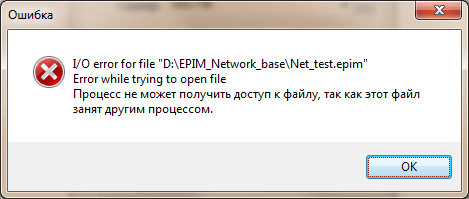
Данная ошибка возникает при попытке подключиться к базе, которая открыта на сервере локально через меню Файл -> Открыть . В этом случае EssentialPIM Pro на сервере эксклюзивно занимает файл и не дает подключиться к базе по сети.
1. Закрыть EssentialPIM Pro на сервере.
2. Чтобы избежать подобной ситуации в дальнейшем, всегда подключайтесь к базе через Файл -> Соединение с сервером , несмотря на то, что файл базы данных находится на этом же компьютере.
Если ничего из вышеперечисленного не помогло, обратитесь, пожалуйста в нашу службу поддержки.
- Comments
- adlermedrado commented May 31, 2015
- This comment has been minimized.
- sorbits commented May 31, 2015
- This comment has been minimized.
- adlermedrado commented May 31, 2015
- This comment has been minimized.
- sorbits commented May 31, 2015
- This comment has been minimized.
- adlermedrado commented May 31, 2015
- This comment has been minimized.
- sorbits commented May 31, 2015
- This comment has been minimized.
- adlermedrado commented May 31, 2015
- This comment has been minimized.
- rxm commented Sep 1, 2019
Comments
Copy link Quote reply
adlermedrado commented May 31, 2015
I tried to use rmate today on one of my servers, I installed using the gem command (gem install rmate) and it installed without errors, but when I tried to open an file, I got the following error:
This comment has been minimized.
Copy link Quote reply
sorbits commented May 31, 2015
Did you setup port forwarding?
On 31 May 2015, at 17:17, Adler Brediks Medrado wrote:
I tried to use rmate today on one of my servers, I installed using the
gem command (gem install rmate) and it installed without errors, but
when I tried to open an file, I got the following error:
Reply to this email directly or view it on GitHub:
#37
This comment has been minimized.
Copy link Quote reply
adlermedrado commented May 31, 2015
Yes, I think I did it, below is my
Is this right? Sorry if it is my fault.
This comment has been minimized.
Copy link Quote reply
sorbits commented May 31, 2015
If that works, then it would seem your config is not working.
On 31 May 2015, at 21:43, Adler Brediks Medrado wrote:
Yes, I think I did it, below is my
Is this right? Sorry if it is my fault.
Reply to this email directly or view it on GitHub:
#37 (comment)
This comment has been minimized.
Copy link Quote reply
adlermedrado commented May 31, 2015
Thank you for your help.
I did it now and I got exactly the same error.
This comment has been minimized.
Copy link Quote reply
sorbits commented May 31, 2015
Is TextMate running on your local machine?
Test if you can connect to TextMate manually via: telnet 127.0.0.1 52698
On 31 May 2015, at 22:03, Adler Brediks Medrado wrote:
Thank you for your help.
I did it now and I got exactly the same error.
Reply to this email directly or view it on GitHub:
#37 (comment)
This comment has been minimized.
Copy link Quote reply
adlermedrado commented May 31, 2015
I tried and it didn’t work, so I changed at Textmate’s config to receive Access from Remote clients, before that this setting was client.
After this change I was able to connect from telnet and from the remote host.
Thank you and sorry for not looking this setting before.
This comment has been minimized.
Copy link Quote reply
rxm commented Sep 1, 2019
I was having the same problem. The issue was not on the remote server, but my local machine (a macOS laptop). What fixed it for me was changing the port number to something else and then back to what it was.
In the TextMate > Preferences > Terminal pane I changed the Port: field to another high number (48000), hit tab, closed the Preference pane. Re-opened it, changed the Port: filed back to what it used to be.
ritchie has asked for the wisdom of the Perl Monks concerning the following question:
|
|---|
| Replies are listed ‘Best First’. | |
|---|---|
| Re: Error while trying to open a file by k_manimuthu (Monk) on Jan 05, 2011 at 04:11 UTC |
|
|
Check the file is exists or not. Get the OS error by using of $! And check the file permission |
[reply] [d/l] [select] |
by ritchie (Initiate) on Jan 05, 2011 at 15:41 UTC |
|
|
[reply] |
by Corion (Pope) on Jan 05, 2011 at 15:47 UTC |
|
Then either $artefact is not what you think it is (especially look for whitespace like newlines at the end of it) or you have filenames with «problematic» characters that don’t fit within Latin-1. |
[reply] [d/l] |
| Re: Error while trying to open a file by Anonymous Monk on Jan 05, 2011 at 04:03 UTC |
|
Don’t feed junk to open? on my operating system, filenames cannot contain | |
[reply] [d/l] |
| Re: Error while trying to open a file by samarzone (Pilgrim) on Jan 05, 2011 at 09:41 UTC |
|
|
Did you notice that you have a space just before «.properties» in your file name? | |