
Интересные исходники, Примеры Delphi-кода, объяснения.
18 апр. 2011 г.
Ошибка «SetThreadContext failed» в Delphi 2007/2009 под Windows 7 x64
Столкнулся с неприятной ошибкой в Delphi 2009 под Windows 7 x64. Как оказалось, точно такая же ошибка присутствует и в Delphi 2007.
При закрытии любого запущенного из IDE приложения появляется сообщение об ошибке: «Assertion failure: «(!»SetThreadContext failed»)» in ..win32src hread32.cpp at line 412 Continue execution?»
После исследования бескрайних энторнетов на предмет бесплатного решения, было обнаружено, что ошибка действительно имеет место быть. И официального решения для нее до сих пор нет.
Но, разумеется, есть неофициальное.
Трудолюбивые программисты могут почитать объяснение, поковыряться в коде хекс-эдитором и сделать так, чтоб работало.
Ленивые программисты могут просто скачать неофициальный патч.
Учтите, что в любом случае никто не несет ответственности за ваши действия.
Thursday, July 23, 2009
Using Delphi 2007/2009 >
I use Windows 7 x64 for daily Delphi development task. If I press F9 to run my application in IDE mode, there is a great chance to hit this error:
‘Assertion failure: “(!”SetThreadContext failed”)” in ‘..win32src hread32.cpp at line 412
Continue execution?
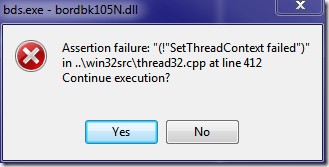
If Press No or ESC key will close the whole IDE. Pressing Yes may prompt for the same dialog more.
There is a temporary solution for this problem. Please note that this problem might gone in Windows 7 RTM release.
This question already has an answer here:
I’m working on something at a client’s site using D2007(CodeGear™ Delphi® 2007 for Win32® Version 11.0.2902.10471). It’s a new installation on a Windows 10(64bit) box.
When I hit -F2 or exit out of the program, I get this strange error dialog:
If I click [Yes] it repeats. I can click [Yes] repeatedly for a while until it finally stops appearing.
If I click [No] then the IDE instantly closes. Any suggestions on how to circumvent this?