
Вы мечтали создать свой аддон для WoW своими же руками?
Это детище от Dan Fernandez (сотрудника Microsoft).
Специальная визуальная среда для разработки аддонов на основе Microsoft Visual Studio 2008.
Некоторые возможности:
Визуальный редактор интерфейса
Редактор Lua с подсветкой синтаксиса
Drag-and-Drop интерфейс
Автоматическая генерация списка контента
Автоматическая генерация Lua-ивентов
Использование XML файлов из World of Warcraft
Дополнительные утилиты, шаблоны для создания Ace2-аддонов.
Поддержка форматов TGA, MP3 и др.
Версия «all-in-one», не требует дополнительно Microsoft Visual Studio (его облегчённая версия — Visual Studio Shell идёт в комплекте):
AddOn Studio for World of Warcraft 2.0 Jan 10 2008 61,23 Мб от 24.04.2009 (cкачиваний: 1290) СКАЧАТЬ
Новая, последняя версия, гарантированно поддерживает World of Warcraft Wrath of the Lich King
AddOn Studio for World of Warcraft v2 BETA 2 8,16 Мб от 24.04.2009 (cкачиваний: 476) СКАЧАТЬ
Требует уже установленного софта:
# Visual Studio 2008 installed including VS SP1
# Visual Studio SDK 1.1 SP1
Если установка этой версии Wow Addon Studio заканчивается неудачей ставим Visual Studio Shell .
Что бы всё это не качать можно попробовать поставить на предыдущюю версию.
По мне так проще пока пользоваться предыдущей версией, тем более работает стабильно.
1.1 Поддерживаемая архитектура процессора:
* x86
* x64
* IA64 не поддерживается
1.2 Поддерживаемые операционные системы:
* Microsoft Windows XP Professional x64 Edition
* Microsoft Windows XP Professional SP2
* Microsoft Windows XP Home Edition SP2
* Microsoft Windows XP Media Edition 2002 SP2
* Microsoft Windows XP Media Edition 2004 SP2
* Microsoft Windows XP Media Center Edition 2005
* Microsoft Windows XP Tablet PC Edition SP2
* Microsoft Windows Server 2003, Standard Edition SP1
* Microsoft Windows Server 2003, Enterprise Edition SP1
* Microsoft Windows Server 2003, Datacenter Edition SP1
* Microsoft Windows Server 2003, Web Edition SP1
* Microsoft Windows Server 2003, Standard x64 Edition SP1 (WOW)
* Microsoft Windows Server 2003, Enterprise x64 Edition SP1 (WOW)
* Microsoft Windows Server 2003, Datacenter x64 Edition SP1 (WOW)
* Microsoft Windows Server 2003 R2, Standard Edition
* Microsoft Windows Server 2003 R2, Enterprise Edition
* Microsoft Windows Server 2003 R2, Datacenter Edition
* Microsoft Windows Server 2003 R2, Standard x64 Edition
* Microsoft Windows Server 2003 R2, Enterprise x64 Edition
* Microsoft Windows Server 2003 R2, Datacenter x64 Edition
* Windows Vista
1.3 Требования к железу:
* Minimum: 1.6 GHz CPU, 192 MB RAM, 1024×768 display, 5400 RPM hard drive
* Recommended: 2.2 GHZ or higher CPU, 384 MB or more RAM, 1280×1024 display, 7200 RPM or higher hard drive
* Running on Windows Vista: 2.4 GHz CPU, 768 MB RAM
* 500 MB of available disk space for the full installation
ВАЖНО! Известные проблемы: (дословный превод)
«Инсталляция может занять длительное время особенно если не установлен .NET Framework 3.5 и пожалуйста не прерывайте установку.»

Описание
Скачать AddOn Studio for World of Warcraft 2.0.40210.1 бесплатно с сайта. Установочный файл программы следующий: WowAddonStudio.exe.
Это бесплатное ПО устанавливается на Windows XP/7/8/10, 32-бит версию. Наш встроенный антивирус проверил эту загрузку и признал ее как 100% безопасную.
Эта бесплатная программа была разработана Microsoft. Версии 2.0 и 1.0 наиболее популярны среди пользователей. ПО принадлежит к категории Фото, а точнее к подкатегории Просмотр и редактирование.
AddOn Studio (AOS) is an open source development environment designed to bring a Visual Studio-like experience to building World of Warcraft AddOns.
Мы предлагаем вам также рассмотреть другие программы, такие как Poster Buddy, Your Birthday News или Photo Cleaner, которые часто используются вместе с AddOn Studio for World of Warcraft.
AddOn Studio 2015 for World of Warcraft is a fully-featured development environment for creating AddOns for World of Warcraft. AddOn Studio features a professional Lua editor with full code-completion and other modern facilities, an integrated visual WoW UI designer, code repository support, project based AddOn file management and deployment, and much more.

AddOn Studio 2015 Edit
-
Visual Studio 2015 Community, using one of these install links:
- AddOn Studio 2010 for WoW — smaller install, older platforms, classic look. same wow features
Patch 8.2 and the Rise of Azshara Battle for Azeroth May wish to check the AddOn Studio option for ‘Tools > Options > AddOn Studio > World of Warcraft > WoW install location’. This option currently defaults to first installed game version, which for many will be the ‘_retail_’ folder, and for some may be the ‘_classic_’ folder. After changing the option, AddOn Studio must be restarted to take effect. Likewise changing this option to the ‘_ptr_’ folder will target the PTR. For most the default will be ‘_retail_’ and will just work. Will look into settings to make this easier, possibly per project. For targeting Classic, see below. 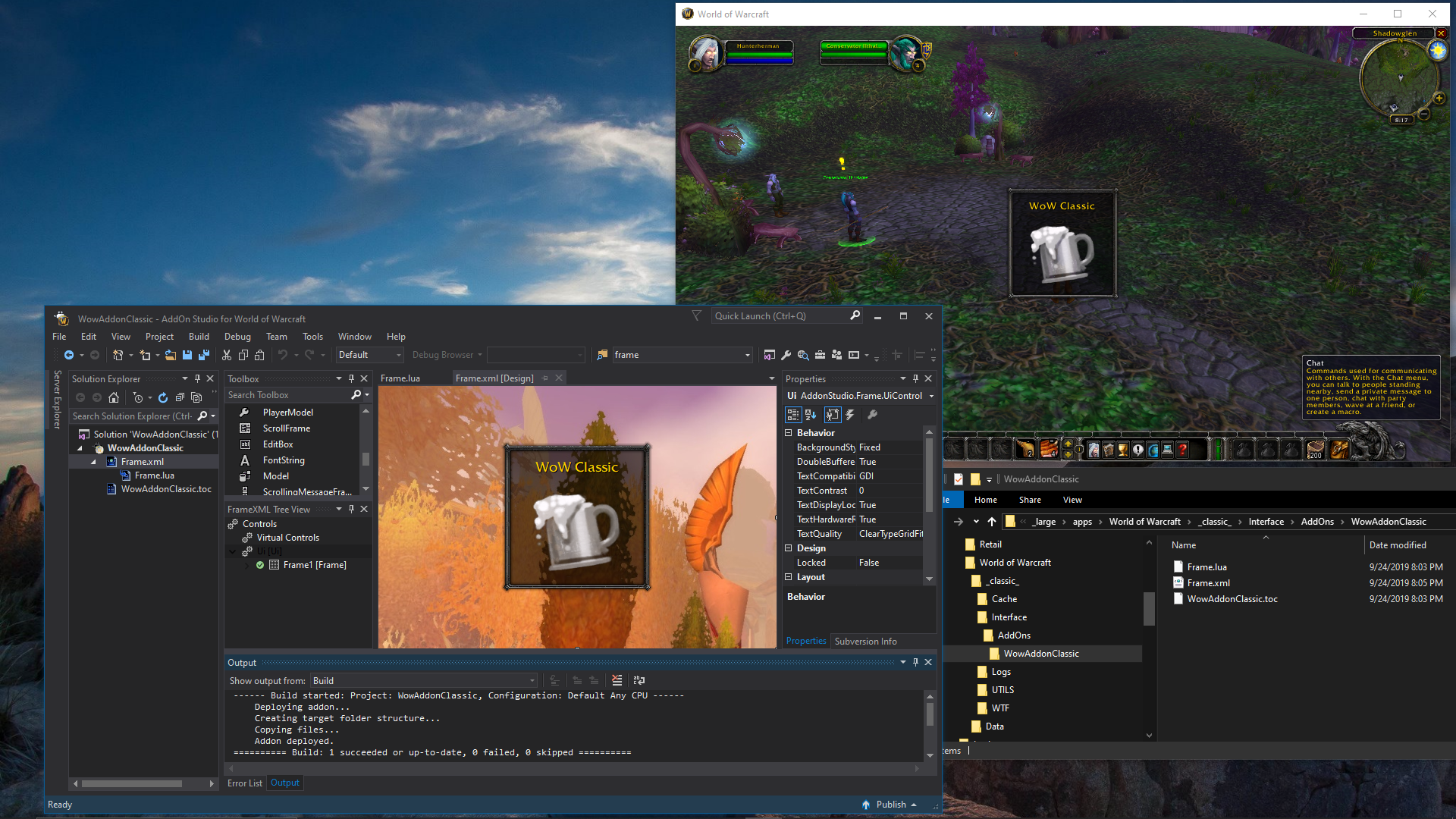
Preview of AddOn Studio 2015 working with the new World of Warcraft Classic
World of Warcraft Classic New support for World of Warcraft Classic was added for AddOn Studio 2010 and 2015, which can be used now in the current beta. The WoW install base option in AddOn Studio may need to set to ‘_classic_’ in ‘Tools > Options > AddOn Studio > World of Warcraft > Alternate install location’ for most users. This option currently defaults to first installed game version, which for many will be ‘_retail_’. After changing the option, AddOn Studio must be restarted to take effect. New Themes All of following are already included in 4.0.190922.0 or newer:
- Dark Theme DarkAS
- Blue Theme BlueAS
- ‘Solarized’ Code Coloration
Update:
AddOn Studio 2015 with the DarkAS Theme and the new ‘Solar’ code colorization
After getting used to the colorization in the MediaWiki built-in Wiki Lua scripting editor for the last week or so, which is a variant of the popular color scheme «Solarized» by Ethan Schoonover, I decided make similar work-a-like color theme in AddOn Studio as I was editing back and forth a lot, and to see how it would look. And I wanted to share for others to possibly enjoy a similar rendition of «Solarized» in AddOn Studio. The AS version has more contrast and hue separation to work in larger range of lighting conditions and screen brightness levels and types, and to be closer to other VS color themes. These will also work in the AddOn Studio 2015 for WildStar beta. 
AddOn Studio 2015 with the «Eclipse» DarkAS Theme and the new ‘Solar’ code colorization
- Eclipse Dark Theme
- Solarized’ Dark Theme
In memoriam of yesterday’s full solar eclipse, is the new «Eclipse» Dark AS theme above, which mutes all of the overly bright IDE colors present in the normal VS ‘Dark’ theme. For some may make it much easier to focus on the code. The normal Visual Studio ‘Dark’ theme has many florescent style bright elements which are significantly brighter than the actual text edit window. This theme brings the brightness of all non-editor elements to ‘at or below’ the brightness of the editor window itself. A pre-built ‘Eclipse (Solar)’ with the «Solar» editor color scheme released the day before, is added for convenience. The can also now be imported on top of any theme, rather than just on ‘Dark AS’ as it was yesterday. Themes Usage:
Can be selected in ‘Tools > Options > General’.
Getting Started Edit
- Download and install the Visual Studio Community 2015 above
(defaults are fine, can skip ‘Launch’ after install) - Download AddOn Studio 2015 for World of Warcraft
- Copy the folder ‘AddOn Studio for WoW 2015’ in the zip file to any location you like, such as: ‘c:Program Files’, or ‘d:apps’, or your Desktop
- Run the WowAddonStudio.exe, or create a short-cut and run that instead.
- Create a new Project
- Add existing files or create new ones
- Deploy to WoW by clicking ‘Build’
- Run WoW or use ‘/reload’ to use your AddOn.
- Rename or delete the installed ‘AddOn Studio for WoW 2015’ folder.
- Follow the Installation steps above, skipping the Visual Studio 2015 install portion.
Product History Edit
AddOn Studio 2015 for World of Warcraft is an update of the AddOn Studio 2010 for World of Warcraft edition, reworked with Visual Studio 2015.
AddOn Studio 2010 for WoW edition will be updated in parallel. Both this version and the 2010 version will be supported together, to give users a choice of which IDE’s style, platform support, and functionality they are more comfortable with.
See AddOn Studio for WoW for a list of editions. See also the AddOn Studio Release History.
Today’s Reality Edit
The general concepts of AddOn and game development, especially for WoW, are far more well understood and by a much larger audience today, than they were during the time of the original World of Warcraft. And since the introduction of AddOn Studio for WoW, many games have come (and some gone) using Lua and similar extensibility methods as WoW. The general expectations of quality in customer level development tools and environments has risen as well.
AddOn Studio 2015 improves on the 2010 edition, with an even more advanced and complete set of features, and is a powerful general IDE for WoW AddOn development using a free Visual Studio back-end (much like the free Community versions of Visual Studio for C#, C++ and Web), with support for graphical Frame XML development. There are quite a few additional Visual Studio integration features, all of which together contribute toward making WoW AddOn development tools real first class citizens, in a world where that almost never happens.
What Changed Edit
New features and changes for the AddOn Studio 2015 edition on initial release:
- New Visual Studio 2015 IDE general set of features.
- See AddOn Studio for WoW History for current specifics, will update more here later.
See AddOn Studio 2010 for WoW: What Changed for previous changes
What Works Edit
Short list covering major historical issues addressed in AddOn Studio 2015 for WoW.
- Includes support for current versions of WoW, originally released with support for Warlords of Draenor — Allowed Includes 70000 version and later features, as well as continuing support for WoW Legion, WoD, and earlier game content files, and Blizzard interface ‘toolkits’. Support for new WoW releases is ongoing. Fixes include more complete CASC support the proper handling of WoW data files.
- SCC Integration for GIT — the new version includes an optional, integrated, and functional version of GIT, with full support for all context menus. This is in addition to the previous SVN support. This allows using Curse Forge or other Git support for remote code repositories. There is tested support for sites like the Curse Forge sponsored WowAce and Curse Forge.
- Windows 10 — using newer set of tools and compilers support was updated for a smoother experience on the new OS, and should still be backward compatible as far back as Visual Studio 2015 support goes. I believe this is the way back to Vista and above, but not back as far as Windows XP, Windows 2000, NT 4.0, or Windows 95. Windows Vista requires Vista SP1. AddOn Studio 2010 for WoW still has support for Windows XP.
- Includes all of the AddOn Studio for WoW specific features from AddOn Studio 2010 for WoW as well.
See AddOn Studio 2010 for WoW: What Works for previous enhancements