
✎ Опубликовано: 04.12.2017 ☕ Просмотров: 7170 ✉ Комментарии: 1

Все ошибки при работе с почтой — разбор причин и методы как их устранить
Приветствую! Сегодня я хочу рассказать о ошибках почты и как с ними бороться. Но сразу надо уточнить что ошибки эти актуальны для smtp а не для функции php mail(); Я думаю что нормальные магазины работают только с smtp — это безусловно лучше чем слать письма с сайта через стандартную функцию в php.
Для отправки почты в Opencart используется библиотека system/library/mail.php — и мы поговорим об ошибках которые могут возникать и способы их решения.
Все ошибки, которые могут быть при отправки почты
- Error: E-Mail to required
- Error: E-Mail from required
- Error: E-Mail sender required
- Error: E-Mail subject required
- Error: E-Mail message required
- Error: EHLO not accepted from server
- Error: STARTTLS not accepted from server
- Error: AUTH LOGIN not accepted from server
- Error: Username not accepted from server
- Error: Password not accepted from server
- Error: HELO not accepted from server
- Error: MAIL FROM not accepted from server
Error: E-Mail to required — это ошибка будет тогда, когда нет данных куда отправлять письмо, попросту либо почта не настроена в админке, либо форма не передает данные в библиотеку для отправки. Для исправления убедитесь что в скрипте отправки есть строка $mail->setTo где и должна быть переменная куда слать почту. Как правило это админ сайта.
Error: E-Mail from required — ошибка возникает когда пытаются отправить почту, но не указали от какого адреса отправлять. Это может быть из-за того что либо не указали почту, а нет валидации, либо скрипт неправильно настроен. Строка $mail->setFrom как раз отвечает за то от кого идет письмо.
Error: E-Mail sender required — все просто, не указано от кого отправка. Не путать с email from. Как раз от кого это и высвечивается на почте, сюда идет либо почта человека, либо его имя. Задать можно через $mail->setSender(«От кого почта»);
Error: E-Mail message required — пустое письмо. Для решения проблемы необходимо указать через $mail->setText или $mail->setHtml тело письма.
Error: EHLO not accepted from server — эта ошибка возникает при неправильных настройках почтового сервера. Часто надо просто указать перед почтовым сервером ssl:// или tls:// — это переводит отправку почты по защищенному протоколу. Также надо указать порт 465 иначе будет эта ошибка. Эти настройки есть в админке в настройка — вкладка почта.
Error: STARTTLS not accepted from server — ошибка tls -соединения. В таком случае надо смотреть на настройки и узнавать какой порт и настройки нужны для корректной работы через tls на почтовом сервере.
Error: AUTH LOGIN not accepted from server — неправильный логин. Смотрите настройки почты и почтового сервера.
Error: Username not accepted from server — неправильное ммя пользователя.
Error: Password not accepted from server — ошибка может быть из-за либо неправильного пароля, либо из-за не существующей почты. Это часто из-за того что на сервере почта еще не создана и письмо пытаемся отправить, либо пароль надо проверить с логином.
Error: HELO not accepted from server — некоторые хостинги блокирую работу по защищенному протоколу почты ssl по-этому либо надо разблокировать, либо перейти на 25 порт и без ssl:// или tls:// в начале smtp сервера
Error: MAIL FROM not accepted from server — самая частая ошибка возникающая при отправке почты с формы обратной связи. Лечится очень просто. Идем в файл catalog/controller/information/contact.php и строки
После правильной настройки smtp у нас почта как правило пойдет не в спам — а куда надо, мало того, когда мы нажмем ответить — ответ пойдет отправителю.
ocStore 2.3.0.2.3 не отправляются письма smtp через mail.ru
Столкнулся с проблемой отправки писем из интернет-магазина на базе ocStore 2.3.0.2.3
Для начала проверьте настройки магазина в админке: Система-Настройки
Откройте редактирование магазина и на вкладке почта установите:
Почтовый протокол: SMTP
Параметры функции mail оставьте пустым
SMTP хост: ssl://smtp.mail.ru
SMTP логин: вашапочта@mail.ru
SMTP пароль: вашпароль
SMTP порт: 465
SMTP таймаут: 60
Затем посмотрите логи /log/error.log
У меня там была ошибка: PHP Fatal error: Uncaught Exception: Error: RCPT TO not accepted from server! in /var/www/clients/client1/web1/web/system/library/mail.php:340
Не работала форма обратной связи и не приходили на почту заказы клиентов.
Я начал с исправления формы обратной связи.
Для этого нужно поправить файл /catalog/controller/information/contact.php
исправить строку
$mail->setReplyTo($this->request->post[’email’]);
на
$mail->setReplyTo($this->config->get(‘config_email’));
Если все исправили, то при отправке формы получите сообщение: Ваш запрос был успешно отправлен администрации магазина!
Для того чтобы приходило оповещение о заказе, нужно исправить файл /system/storage/modification/catalog/model/checkout/order.php
в 3х местах найти строки
$mail->setTo($order_info[’email’]);
или
$mail->setTo($this->config->get(‘config_email’));
и заменить их на:
$mail->setTo($this->config->get(‘config_email’));
$mail->setReplyTo($this->config->get(‘config_email’));
Если все получилось, то в конце оформления заказа, будете получать сообщение:
Opencart | Date: Dec 15, 2014
This is a patch to fix problems with sending contact form in Opencart 1.5 and 2.0.
If you get the following message:
Notice: Error: RCPT TO not accepted from server! in system/library/mail.php on line 308
in your Opencart installation, be it v 1.5.x or 2.0.x, then probably your email provider has SPF policy (Sender Policy Framework) verifying the so-called FROM address. This is a good thing, it means that your email provider has a properly configured server that protects from spam messages and other improper uses.
With SPF policy, you cannot put anything you want in the FROM field, it needs to match your account address or at least your email domain.
In other words, if your email address for the shop is, let’s say, moc.niamodruoy@pohs, it will probably only allow moc.niamodruoy@pohs as a sender address or in the best case scenario moc.niamodruoy@GNIHTYNA
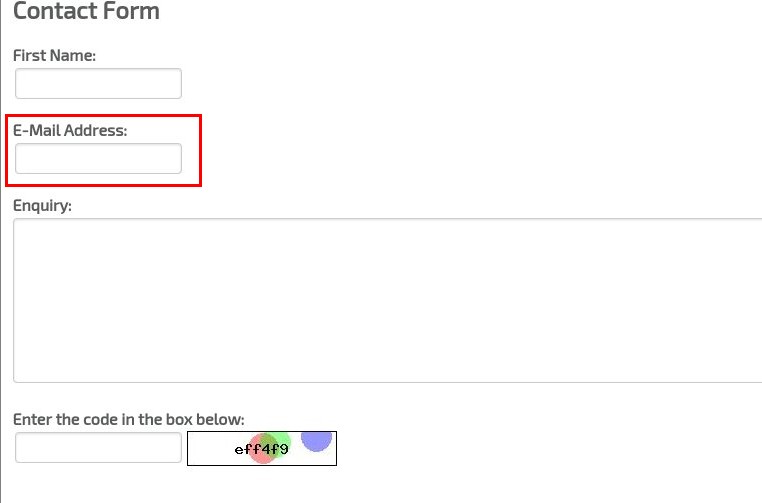
The error listed above is caused by the fact that OpenCart for some reason is using another approach. In OpenCart solution, the email address that your client is putting in the contact form is automatically assigned by the OpenCart system as the FROM field of the message. It means that the contact form message is forcefully interpreted as a message coming from your client’s email account (which is not the case, your client is not sending this message from his email account, he only gives you his email address so that you can reply to him).This means that a properly configured server will not send such a message and your client will not be able to contact you.
So should you ask your email account provider to change this SPF or whatsoever setting so that you’re able to use OpenCart way of doing things?
What is the right solution, then?
The best thing to do is to modify your OpenCart emailing library to make it act properly 🙂
This is really easy as you only need to change just a few lines of code in 2 files.
Below you have 2 tutorials how to change it for OC 1.5 and 2.0 versions. If you don’t feel like doing it on your own, I have written simple vqmods that will do the same thing for you. You can download them here – Notice: Error: RCPT TO not accepted from server! – fix (VQMOD)
If you don’t have Vqmod installed or you don’t want to install it just follow the steps in the tutorials.
Opencart 1.5 Fix
First edit the file catalog/controller/information/contact.php
Look for line: in my version it is line 20
Change it to:
What this will do is set the FROM field to be the same as your shop’s main email address.
You can hardcode (but I wouldn’t recommend it) an email adress here if you want by changing this line to ie:
Now find the line: It should be below the line we just edited or somwhere near.
Change it to: What this will do is set your client’s email provided by him in the contact form as reply-to email, so that you’re able to respond automatically to contact form messages by clicking on Reply button.
It is also setting your shop email address as sender’s name.
In the beginning you will have line:
Just add this before it:
Find line: and before it add: What we did here is to add REPLY-TO function which is missing in 1.5 (but is present in 2.0) and allows us to set different reply-to addresses than FROM address.
and change it to: Here we are correcting the way reply-to address is set (it will use the email address your client introduced in the contact form).
And that’s it!
If you have any problems with OC and need professional help or support
Opencart 2.0 fix
It is simplier to change in the newest version of OC because there is already a funciton to set Reply-To address.