
(1.02 GB) Safe & Secure
Remix OS 3.0.207 (64-bit) LATEST
Windows 7 64 / Windows 8 64 / Windows 10 64
Remix OS (64-bit) 2019 full offline installer setup for PC
Remix OS 64-bit version combines the productive power of PC with full access to the Android app and game ecosystem. The tool began as a vision for a world in which the boundaries between mobile and PC would forever be eliminated. Join the millions of users who have already switched to Remix OS 64-bit and become a part of the future of Android PC.
Universally Android
The app gives you access to over 2+ million Android apps and games. Most are free and can be installed with a single click from any Android app store of your choice.
The freedom of choice
A key advantage to Remix OS’ Android app ecosystem is the flexibility to choose the apps that best fit your habits and preferences.
If you already use Android, you’ll love what you can do with Remix OS
Think of the app as the love-child between an intuitive PC desktop experience and Android apps + games. «The multitude of features we’ve meticulously engineered into RemixOS are designed to bring you the best of both worlds — a complete fusion of mobile and PC.»
Advertisement
Downloads
Description
Remix OS is a free Android version made by Jide, the company behind this operating system. This OS comes with certain basic Android features adding some missing functions that are present for Mac and Windows users.
You can find a windows interface, mouse and keyboard support, a system bar and file manager, etc. Obviously, it also has other 3rd party installed apps. Theoretically, you should be able to install this OS on most popular laptop brands, but support for more machines is being added with each new version.
Note: Google and the Google logo are registered trademarks of Google Inc.
Remix OS Review
Have you been searching for a free way to bring Android to your PC or laptop? Jide Technology’s Remix OS might be the answer. Their latest creation, Remix OS, can operate on just about any computer or virtual device.
Remix OS Background
Remix OS was derived from Android-x86, an open-source project that allows Android to function on regular PC hardware. Remix OS provides a system for windowing that makes the operating system much more intuitive. You will enjoy running this software on your PC. You can also put Remix OS onto a USB drive and boot it up on the go. The USB drive even allows for the saving of your personal settings and files. You can think of the USB drive Remix OS as a Linux live system of sorts.
Remix OS Fundamentals
The software’s start menu features browser, contacts, calculator, downloads, file manager, settings and so on. Jide also offers an array of apps that were built specifically for the Remix OS. You will find them in the Jide marketplace. The Google Play store functions as it should. All in all, Remix OS is the desktop edition of Android. In technical terms, it is a fork of Android. To be more specific Jide relied on the open source version of the OS and reconstructed it with different code for the settings, interface and beyond. The result is an experience that is very similar to Android. Those who are familiar with Android will enjoy little to no learning curve.
Remix OS Features
The software now features a menu bar like the taskbar used in Windows. It runs across the entire width of the display. The bottom left features a Jide logo button that will trigger an app launcher via the start menu. The desktop features icons for all of your folders, applications, icons and so on. It’s quite similar to a Mac OS X. Pretty much everything you could expect from a desktop operating system is available with Remix OS. The program allows users to right click to access context menus along with those great keyboard shortcuts. You can even resize the windows to your personal preference. Users who take advantage of the apps in the Google Playв„ў store will find that the OS functionality is superior to Chrome OS extensions.
Remix OS Faults
Some users have complained that the program’s cursor is annoying. It is an empty circle that fills as one click. This is somewhat confusing because it takes the appearance of a cursor that is loading. There is nothing loading in the background. Others have complained that the software’s settings are primarily limited to the conventional ones on Android. Some users have expressed that there should have been a stronger focus on settings that were strictly beneficial to the new interface. Apps that typically function on phones often don’t operate as designed unless the window is kept to the size of that used on a phone screen.
Remix OS Verdict
Many believe that Remix OS turned out to be what Chrome OS always should have been. The user experience is not consistent across apps. Remix OS shines brightest as a mobile operating system that can be used in particular circumstances. Look for most people to rely on it a means of quickly accessing files on a friend’s computer or to boot into a media center. The bottom line is that Remix OS is certainly smooth yet some will find that it is not worth installing on a MacBook, Toshiba, Dell or another computer. Others had an excellent experience, and Jide, the company behind this OS, promised better and improved future versions so I would not be surprised to see this OS gaining traction in the future.
Important: Remix OS is built on Android-x86, please donate to Android-x86.
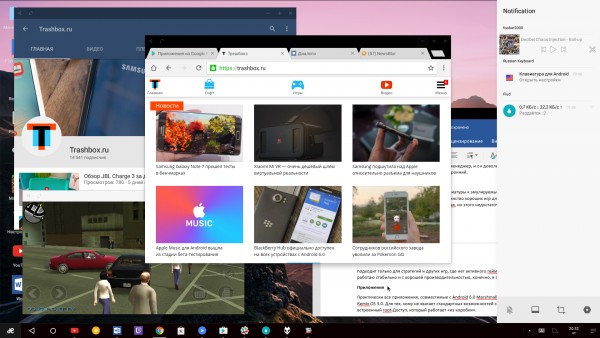
Подробнее о возможностях Remix OS 3.0 вы можете узнать в нашем обзоре этой операционной системы.
Системные требования Remix OS 3.0:
- двухъядерный процессор с тактовой частотой 2 ГГц или лучше;
- 2 ГБ оперативной памяти или больше;
- минимум 8 ГБ свободного места на диске;
- хороший доступ к интернету.
Ссылки на скачивание Remix OS 3.0:
- Remix OS 3.0.102 64-бит (торрент, зеркала).
- Remix OS 3.0.102 32-бит (торрент, зеркала).
Установка рядом с Windows
Самый простой способ установить Remix OS 3.0 на компьютер — воспользоваться официальной утилитой для тех, у кого уже на компьютере есть современная Windows. Все операции со своим компьютером вы производите на свой страх и риск.
Как установить:
-
Сначала скачиваем нужный вам образ по ссылке сверху (лучше торрентом). Распакуйте скачанный архив в какую-нибудь папку на компьютере.
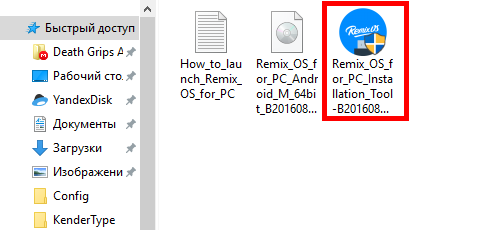
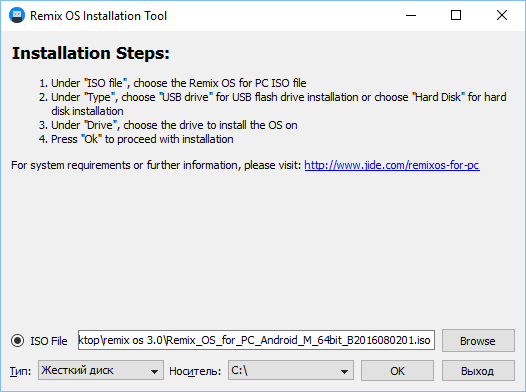
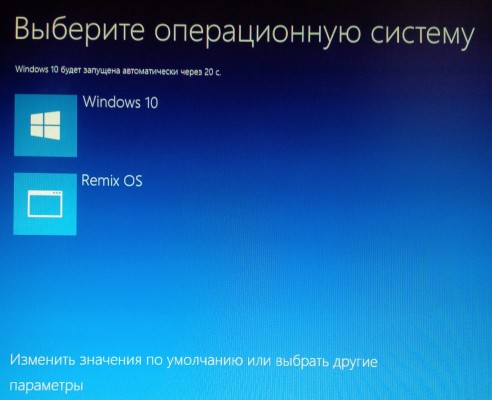
Установка на флэшку
Также разработчики предоставляют возможность создать загружаемую флэшку с Remix OS 3.0, которая работает по примеру LiveCD.