
Posted by admin on Среда, Апрель 9, 2014 · 1 комментарий
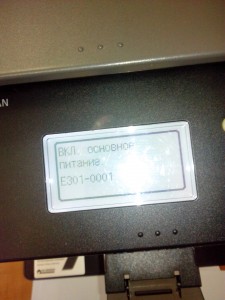
Обычный рабочий копир canon mf4410 как то выдал странную ошибку «Вкл. Основное питание E301-0001».
После некоторых размышлений и поиска информации в интернете, решил исключить самые простые возможные причины возникновение данной ошибки. «Вкл. Основное питание E301-0001»
1 включить выключить питание с паузой между процессами (не помогло)
2 потрясти данный аппарат (не помогло)
3 протереть стекло с верхней стороны (не помогло)
4 разобрать аппарат и протереть стекло с внутренней стороны (не помогло)
5 Потрогать и подоткнуть шлейфы (ПОМОГЛО)
Процесс разборки mf4410
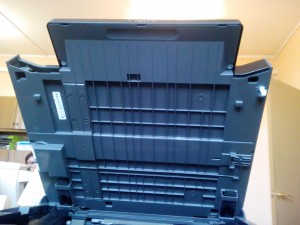
поднимаем крышку сканера 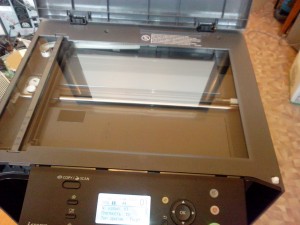
Вытираем стекло, в надежде что может поможет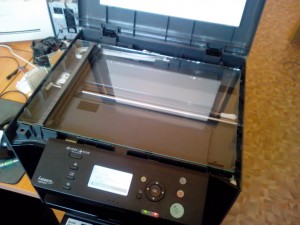
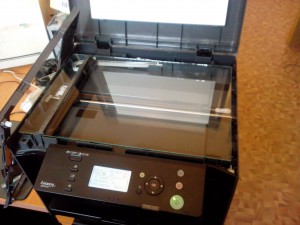
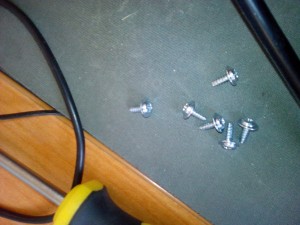
Что бы снять верхнею панель и стекло, потребовалось открутить 6 саморезов
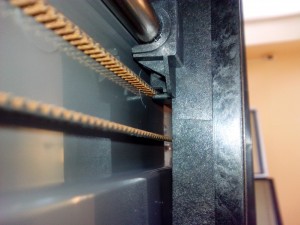
Сам сканер легко снимается, главное его потом правильно поставить, что бы зубчатый ремень попал куда нада в сканере
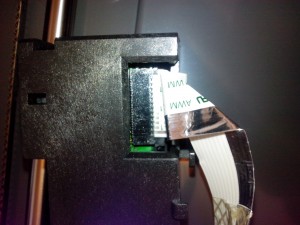
Вот этот шлейф который идет к сканеру, я его просто подоткнул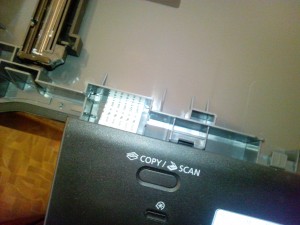
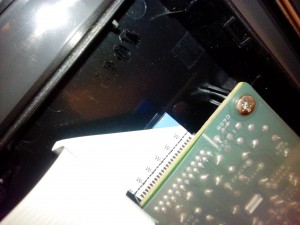
Шлейф который идет к панеле управления тоже подоткнул, на всякий случай
По окончанию работ, мфу было собрана, лишних деталей не осталось, аппарат отдан для дальнейшей работы в отдел.
Filed under Работа · Tagged with работа, разное
Обращаем внимание на призыв к помощи от самого МФУ – обычно он организуется в виде вывода кодов ошибок на дисплей оборудования. Среди самых популярных из них:
• E000-0000. Ошибка узла термозакрепления.
• E004-0000. Ошибка двигателя печки.
• E100-0001. Включите основное питание. Проблема с датчиком лазера. Проверьте посадочное место (шахту).
• E202-0002. Включите основное питание. Ошибка позиционирования сканера. Отключите питание, откройте крышку сканера, включите питание и проверьте положение датчика сканера.
• E301-0001. Включите основное питание. Ошибка сканера. Недостаточная интенсивность освещения.
Также смотрим на исправность работы драйверов, программного обеспечения и прошивки. Персональный компьютер, ноутбук или планшет Вам в помощь. С помощью их панели управления проверяем драйвер: дату разработки (возможно он устарел), версию, название поставщика и сведения о файлах. Новую версию без труда можно найти и скачать на официальном сайте производителя Canon в разделе Поддержка.
Откройте в ПО или панели управления данные о картриджах – возможно причина отказа работы МФУ Кэнон кроется всего лишь в том, что тонер в картридже закончился.
Светятся ли индикаторы или слышен ли нормальный шум работы устройства? Нужно понимать, исправен ли шнур питания от электросети и нет ли проблем с кнопками включения оборудования.
Протестировав работоспособность многофункционального устройства можно сделать выводы, починить его или же составить грамотную заявку на вызов инженера сервис-центра. Она должна содержать в себе: тип, бренд и модель аппарата, формат печати, цветность, технологию печати, скорость выдачи листов и результаты Вашей самостоятельной диагностики. Это позволяет ускорить процесс обработки заказа на ремонт МФУ Canon. Прайс лист ЯузаОргСервис находится в открытом доступе – Вы можете скачать его бесплатно прямо сейчас и оставить запрос на предоставление услуги по диагностике или ремонту многофункционального устройства Кэнон.
Show error code 301-0001 after press START key
Posted by Sulafa hassan on Nov 27, 2012
- 1 Answer
- dulal sk
- 3 Suggested Answers
- 6ya staff
- Computer hardware and networking support
- Luigi Lozada
- Add Your Answer
- Draw a box over the problem!!
- Attachments: Added items
- Related Questions:
- Error code E 225 on my canon i-sensys MF 4330d
- Ma machine canon I-SENSYS MF 4550d , s affiche erreur E301-001,que veut dire ce code , et qu est- ce qu il faut faire?
- CODE 162,0,0 ON CANON D1350
1 Answer
dulal sk
An expert who has achieved level 1.
An expert that has 1 follower.
An expert whose answer got voted for 2 times.
Show error code 301-0001 after press (Problem with Canon i-SENSYS MF4140 All-In-One Laser Printer
Error code 301-0001 on i-sensys MF 4450cont: 8016185745-dulal
Posted on Jul 24, 2013
sir , how i solve problem canon 4450 printer problem e301 sir , how i solve problem canon 4450 printer problem e301
Description
Insufficient light intensity in shading
Remedy
When the same error repeatedly occurs after several times of turning the power OFF/ON, execute the following remedies.
(1) Check the connection of Flat Cable between Main Controller Board (J5) and Contact Sensor.
(2) Replace the Flat Cable between Main Controller Board (J5) and Contact Sensor.
(3) Replace the Contact Sensor.
(4) Replace the Main Controller Board. Code E301-0001 Description Insufficient light intensity in shading Remedy When the same error repeatedly occurs after several times of turning the power OFF/ON, execute the following remedies. (1) Check the connection of Flat Cable between Main Controller Board (J5) and Contact Sensor. (2) Replace the Flat Cable between Main Controller Board (J5) and Contact Sensor. (3) Replace the Contact Sensor. (4) Replace the Main Controller Board.
3 Suggested Answers
6ya staff
- 2 Answers
Hi there,
Save hours of searching online or wasting money on unnecessary repairs by talking to a 6YA Expert who can help you resolve this issue over the phone in a minute or two.
Best thing about this new service is that you are never placed on hold and get to talk to real repairmen in the US.
Instant Repair Help over the Phone
Save Time & Money by instantly connecting to.
Posted on Jan 02, 2017
Computer hardware and networking support
- 4281 Answers
Click here Click on above link download driver for your os . Let me know if you need further assistance. Thanks for using FixYa.
Posted on Sep 15, 2011
Luigi Lozada
- 91 Answers
Hi flord, this error code on CANON, (E000) means that the Fusing unit not heating up, the mostly of cases this unit is damaged and need to be replaced.
you migth contact canon support to replace the fuser of the printer. maybe you have printer too many sheets.
Posted on Apr 07, 2010
Add Your Answer
Tips for a great answer:
- — Answer the question.
- — If you need clarification, ask it in the comment box above.
- — Better answers use proper spelling and grammar.
- — Provide details, support with references or personal experience.
Draw a box over the problem!!
Attachments: Added items
Complete. Click «Add» to insert your video. Add
Related Questions:
Error code E 225 on my canon i-sensys MF 4330d
Ma machine canon I-SENSYS MF 4550d , s affiche erreur E301-001,que veut dire ce code , et qu est- ce qu il faut faire?
My machine gun I-SENSYS MF4550d, appears E301-001 error, what does this code, and that is, that it be done?
CODE 162,0,0 ON CANON D1350
This happens across the range of Canon Printers. The fix is to push the right button! Yeh I have a differing model, but the answer is the same. Go to the printer and select remote scan. Then invoke computer program. Some one has to be boss either the printer or the computer for scanning.
I can make the scanner printer the boss and issue a TIFF scan to the computer. Just push scan on the printer and select computer (it does a push data)
I can make the computer the boss by selecting the steps below:
Please choose what option you require. Ignore the model number.
The error codes 162,0,0, or 255,0,0, usually indicate that you have not selected a scan type at the machine. Please follow the steps below to perform a scan from the image I-SENSYS MF8230Cn:
Verify that MF Toolbox is closed on the computer and press the [SCAN] button on the printer.
Highlight [Remote Scanner] and press [OK]. The screen will show, «Remote Scanner. Waiting online. «.
On the computer, open the MF Toolbox and select [PDF].
Click the green [START] button on the [PDF] window. The machine will start processing the scan.
If you receive any errors or need further assistance with the I-SENSYS MF8230Cn, we recommend that you contact us at 1-800-OK-CANON (1-800-652-2666).