
Flex Time—similar to what is often referred to as elastic audio in other applications—simplifies the process of editing the timing of notes, beats, and other events in audio regions. You can compress or expand the time between specified events in an audio region without the need for trimming, moving, nudging, or crossfading.
You can edit the timing of notes and beats in audio regions using flex markers. When you choose a Flex Time algorithm, the contents of the audio track are analyzed for transients, or significant peaks, and any detected transients are marked in the audio regions. You can add a flex marker at a specific part of the waveform you want to edit. After adding flex markers to an audio region, you use them to time stretch—compress or expand—the audio material. The initial boundaries within which this is done are determined by the transient markers.
Flex Pitch allows you to quantize and edit the pitch of audio material. You edit the pitch of audio material by choosing the Flex Pitch algorithm. The contents of the audio track are analyzed for pitch using a pitch detection process, and the results are plotted on a pitch curve.
You can edit the timing of audio in the Tracks area and the pitch in the Audio Track Editor. You can also Create MIDI regions from audio recordings using Flex Pitch.
Note: Flex Time is also integrated with the Smart Tempo feature of Logic Pro. For more information on Smart Tempo and how it interacts with Flex Time, see Smart Tempo overview.
 Flex Time is also available in the Audio Track Editor and Flex Pitch in the Tracks area, when Show Advanced Tools is selected in the Advanced preferences pane.
- Turn on flex in the Tracks area
- Turn on flex in the Audio Track Editor
- Assign the same flex algorithm to all audio tracks
- Isolate indiv > Select an audio region or take region, then deselect the Flex checkbox in the Region inspector. All flex editing properties on the region or take region are disabled, but not deleted, and the region plays at its original speed. To re-enable flex editing properties for the region, select the Flex checkbox again. В аудио редакторе не отображаются вкладки Track, File. Как их включить? Как включить режим редактирования Flex Pitch? Для того, чтобы активировать все функции и инструменты Logic Pro X необходимо зайти в меню Logic Pro X > Preferences > Advanced Tools… и поставить галочки во все чек-боксы. Во время того, как дополнительные функции будут активироваться, окно Logic будет закрываться и открываться несколько раз. Это нормально. Для того, чтобы редактировать аудио в режиме Flex Pitch выделите необходимый аудио регион и включите режим Flex Pitch в Inspector, либо двойным кликом по аудио региону откройте редактор аудио и в меню редактора включите режим Flex Pitch. Поделиться материалом с друзьями или забрать себе на стену: Очередь просмотра Очередь Удалить все Отключить YouTube Premium Хотите сохраните это видео? Пожаловаться Пожаловаться на видео? Выполните вход, чтобы сообщить о неприемлемом контенте. Понравилось? Не понравилось? Текст видео Logic Pro X Flex Pitch — Go here for more detailed tutorials — Free Signup In this video we discuss how to use the new flex pitch tool by Logic ProX. If you’re familiar with the Melodyne pitch plug-in then this will be very similar. It is an amazing tool to pitch correct a vocal or instrument.
- Очередь просмотра
- Очередь
- YouTube Premium
- Хотите сохраните это видео?
- Пожаловаться на видео?
- Понравилось?
- Не понравилось?
- Текст видео
Turn on flex in the Tracks area
Do one of the following to show the flex parameters:
Choose Edit > Show Flex Pitch/Time from the Tracks area menu bar (or press Command-F).
Click the Show/H /> in the Tracks area menu bar.
A Track Flex button and Flex pop-up menu appear in the track header of each audio track.

Click the Track Flex button  in the track header of the audio track you want to edit.
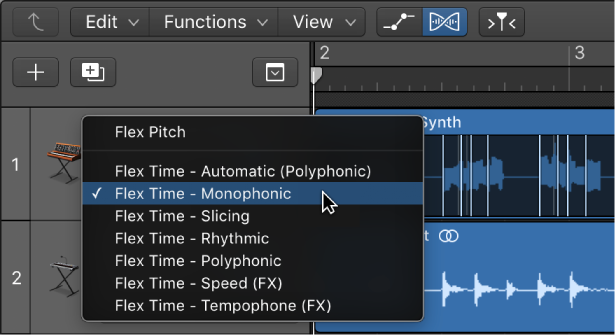
In the Tracks area, the regions on your track now display transient markers inside the waveform as shown in the figure above. In the Region inspector the Flex checkbox is now selected. In the Track inspector the Flex pop-up menu is now available for use. If you do not see transient markers displayed in the audio waveform in the Tracks area, be sure that the Flex checkbox in the Track inspector is selected.
Choose Flex Pitch or one of the Flex Time algorithms from the Flex pop-up menu.
Turn on flex in the Audio Track Editor
Open the Audio Track Editor by doing one of the following:
Select an audio track in the Tracks area, then choose View > Show Editors.
Select an audio track in the Tracks area, then click the Editors button  in the control bar.
Double-click an audio region.
Click the Show/H /> in the Audio Track Editor menu bar (or press Command-F).
Note: Click the Audio Track Editor’s workspace before using the keyboard shortcut, to make sure that the Audio Track Editor has key focus.
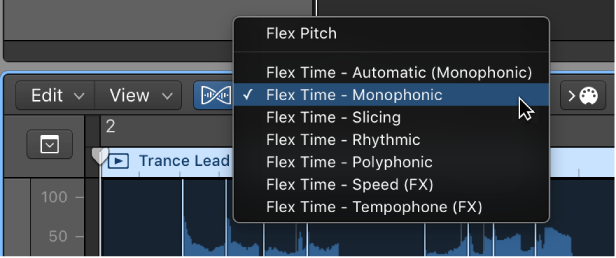
A dialog window asks if you want to turn on flex for the selected track, if it’s not already on. A Flex pop-up menu appears to the right of the Show/Hide Flex button in the Audio Track Editor menu bar.
Choose Flex Pitch or one of the Flex Time algorithms from the Flex pop-up menu.
Assign the same flex algorithm to all audio tracks
In the Tracks area or Audio Track Editor, hold down Shift while choosing a flex algorithm from the Flex pop-up menu.
Isolate indiv >
Select an audio region or take region, then deselect the Flex checkbox in the Region inspector.
All flex editing properties on the region or take region are disabled, but not deleted, and the region plays at its original speed. To re-enable flex editing properties for the region, select the Flex checkbox again.
В аудио редакторе не отображаются вкладки Track, File. Как их включить? Как включить режим редактирования Flex Pitch?
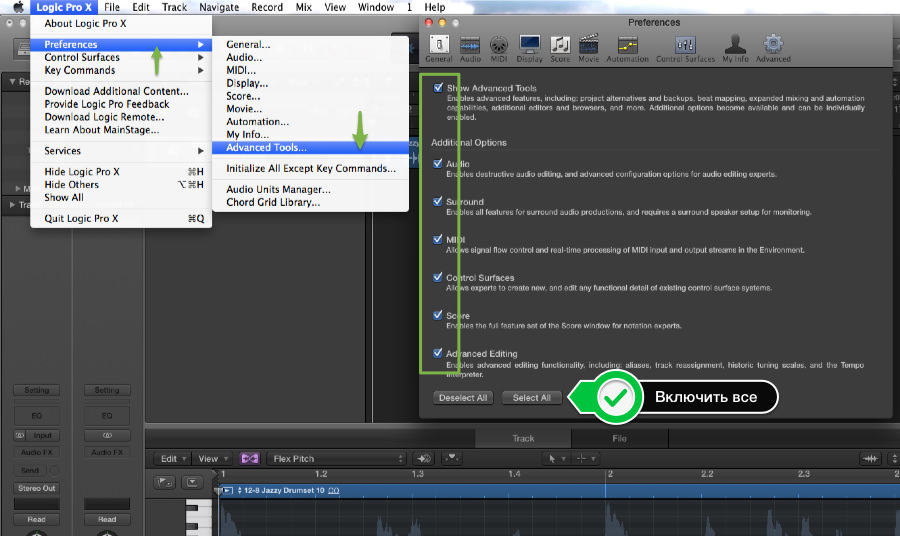
Для того, чтобы активировать все функции и инструменты Logic Pro X необходимо зайти в меню Logic Pro X > Preferences > Advanced Tools… и поставить галочки во все чек-боксы. Во время того, как дополнительные функции будут активироваться, окно Logic будет закрываться и открываться несколько раз. Это нормально.
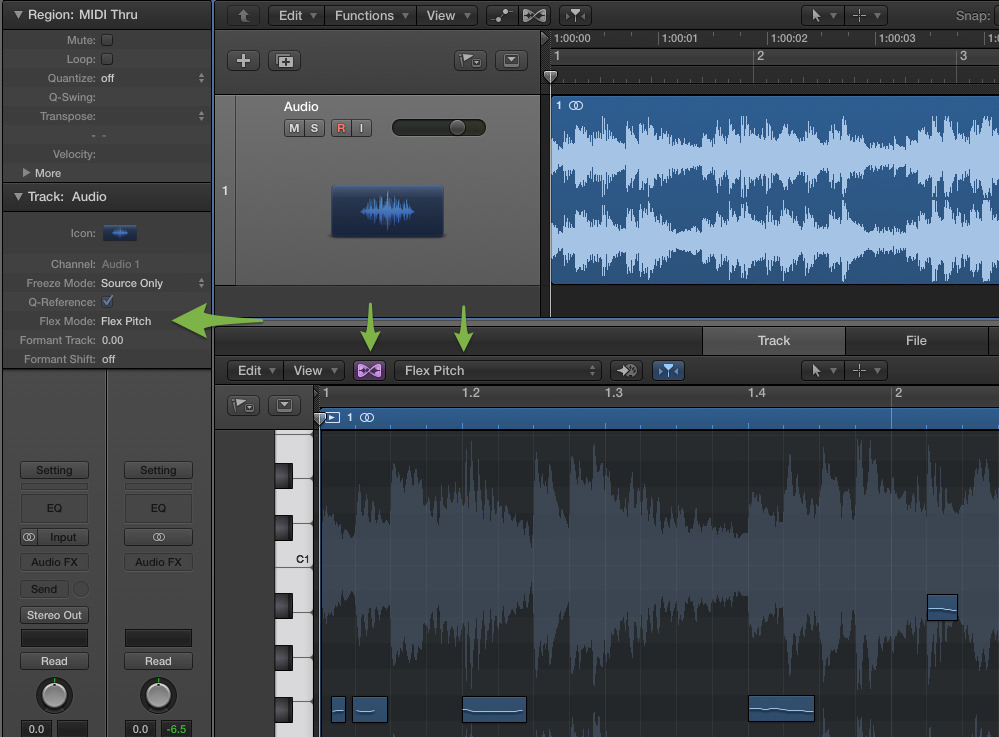
Для того, чтобы редактировать аудио в режиме Flex Pitch выделите необходимый аудио регион и включите режим Flex Pitch в Inspector, либо двойным кликом по аудио региону откройте редактор аудио и в меню редактора включите режим Flex Pitch.
Поделиться материалом с друзьями или забрать себе на стену:
Очередь просмотра
Очередь
- Удалить все
- Отключить
YouTube Premium

Хотите сохраните это видео?
- Пожаловаться
Пожаловаться на видео?
Выполните вход, чтобы сообщить о неприемлемом контенте.
Понравилось?
Не понравилось?
Текст видео
Logic Pro X Flex Pitch
— Go here for more detailed tutorials — Free Signup
In this video we discuss how to use the new flex pitch tool by Logic ProX.
If you’re familiar with the Melodyne pitch plug-in then this will be very similar. It is an amazing tool to pitch correct a vocal or instrument.